Just replace “let my daughter go now” with “re-rate my app”.
On the phone with someone who gave my app a bad rating
by Tony Lukasavage on Tuesday, May 15th, 2012 |  3 Comments | Tags: funny
The Joys of Screen Scraping
by Tony Lukasavage on Thursday, March 1st, 2012 | 1 Comment | Tags: Android, knucklehead, Mobile
Knucklehead Up and Running Again

For about a week there my MMA fighter app for Android, Knucklehead, has been out of commission. The reason is that the site that I scrape for data, Sherdog was completely redesigned. I needed to rework a lot of my PHP-based screen scraping code to make it work. My PHP is rusty, but fortunately, my regular expression chops are always sharp. In any case, it’s back to working order now.
Maybe with a little luck I can get people to re-rate those 1-star ratings I got while it was down. If not, perhaps I can guilt people into giving me good ratings by saying that it’s my newborn son’s fault I didn’t get to it sooner. I mean, really, are you going to give the father of this child a hard time? Don’t be so heartless. 

Screen Scraping Tips
As we all know, screen scraping is pretty much the most volatile way to supply your apps with data. While no amount of planning can permanently future-proof your screen scraper, there’s some things you can do to make it easier.
- Define a data model for what you are scraping. What made my project relatively easy to get working again was that I had a clearly defined data model shared by both the backend and frontend. In my case, this is a LAMP stack and distributed Android app respectively. Now my users don’t need to download a new version of my app in order to get the fix. It just works now.
- Code the scraper on a backend proxy, not in the app itself. That way, when your scraper inevitably gets broken at some point (after a year in my case), you only need to change the code in one place. This goes hand-in-hand with defining a data model.
- Keep it simple stupid. Don’t over-architect a screen scraper. Most data processing code will change over time, but a screen scraper may need a total rewrite at some point. Put all your software engineering skills into controlling what leaves the scraper, but play it pretty loose with what the scraper is going to be processing.
- Using JSON? You better be using jsonlint.com too. jsonlint.com can save you a lot of time and aggravation when it comes to creating and processing your scraped data. Not only does it validate your JSON, but it will also pretty print it so it’s easy to read through yourself.
That’s just a couple things that made fixing my scraper a lot less painful. You guys out there have any tips? I’d love to hear them. All things being equal, I hope I never have to screen scrape for data ever again. But since that’s pretty unlikely, it’s good to be prepared for the inevitable obstacles that scraping will present.
Path menu with Appcelerator Titanium
by Tony Lukasavage on Wednesday, February 15th, 2012 | No Comments | Tags: appcelerator, titanium
Here we go again…
Yep, another cross-post from the Appcelerator blog. This time it shows off how I managed to implement the dynamic and unique Path menu in Titanium. From a single code base the menu is fully functional, with native performance, on both Android and iOS.
Video
3D, Sockets, and Native Android with Appcelerator Titanium
by Tony Lukasavage on Friday, December 2nd, 2011 | No Comments | Tags: 3d, Android, appcelerator, canvas, Mobile, threejs
Yeah, yet another cross-post from the Appcelerator Developer blog. This was a fun one, though, where I got to show off some really cool features and functionality of the Titanium platform. There’s a lot covered so it’s stretched over a 3 part series. I’ve brought them all together here for your viewing pleasure. The original blog post links included with each video contain links for all the source code and references associated with each video.
Here’s the 10 second summary of each part:
- Create a native Android module to determine a device’s physical orientation as azimuth, pitch, and roll
- Use the above data to animate and render a 3D model using a Titanium WebView
- Represent this 3D model on multiple remote client devices simultaneously using high volume, realtime network communication via Titanium Sockets
Part 1 – Native Android Module
Part 2 – 3D With Three.js
Part 3 – Sockets
Forms with Appcelerator Titanium
by Tony Lukasavage on Friday, October 14th, 2011 | 4 Comments | Tags: appcelerator, commonjs, Mobile
I don’t cross post often from the developer blog over at Appcelerator, but people seem to be liking this screencast so I thought I’d share. I put together some code and a video showing off how you can you use cross platform design, modular Javascript, and of course, Titanium to deliver a simplified interface for creating forms in your mobile apps. Aside from it being easy for developers to implement, there’s also a special focus on making the forms as easy to navigate as possible for the end user.
I’ve tried not to overpopulate this blog with Appcelerator content ever since joining them as a platform evangelist. I think I’ve earned an Appcelerator post though after talking exclusively about PhoneGap and Adobe in my last one though. 
Additional Resources
Adobe & PhoneGap: Makes Sense, Mostly
by Tony Lukasavage on Monday, October 10th, 2011 | 10 Comments | Tags: adobe, Mobile, phonegap
Adobe Acquires Nitobi
So if you haven’t heard yet, Adobe acquired Nitobi, the company that is responsible for PhoneGap. This was announced at Adobe’s big MAX conference. If you are unfamiliar with PhoneGap, then this post is going to be wildly uninteresting to you. At a high level, they provide a cross platform mobile development solution that leverages native webviews with HTML5, CSS, and Javascript to create native mobile apps.
Not Hard To See Coming
Well, for one thing, Adobe was obviously hedging its bets on Flash/Air’s viability in the long term with mobile when they started introducing HTML5 capabilities through Edge. I mean, if Adobe’s planning to offer interactive, Flash-like development with HTML5, who is going to believe that Flash itself has a real future with mobile? Or as Gizmodo put it, Adobe Edge may become the beginning of the end for Flash. Yeah, it will likely always exist, but it is not the de facto standard for delivering interactive web (or mobile) content anymore.
And of course there’s the whole Adobe Air for mobile thing. Android was obliging enough to make Air a first class citizen. Install Air, run Air apps… simple. And while the Adobe Air install is a bit hefty, it’s hardly something worth worrying about with today’s storage capabilities on mobile devices.
“Flash has been labeled an outlaw and Air is smuggled in like an illegal immigrant”
The more harrowing journey for Adobe has been iOS. Basically, Flash has been labeled an outlaw and Air is smuggled in like an illegal immigrant. There’s been a staring contest between Adobe and Apple for a while now, but I think it’s safe to say Adobe blinked. Apple has continually proven that is has the most marketable mobile devices available, and has done so without any back pedaling on what they will and will not allow (minus letting 3rd parties build apps).
Something had to give if Adobe was going to get a real foothold in the mobile world, and it obviously wasn’t coming in the form of their current solutions. Enter PhoneGap…
But PhoneGap is not Without Its Challenges
 |
| Image by |
PhoneGap fills a lot of holes for Adobe, but its going to need a lot of help itself. I think PhoneGap has gone about as far as it can on its own. It has achieved its goal of abstracting most native functionality for many different mobile platforms, but starting developers are wanting more.
PhoneGap has no user interface components. This is not fun for new developers… or veteran ones for that matter. You need to build everything from scratch or go out and find a UI framework that works for you. The 2 front-runners, Sencha Touch and jQuery Mobile, bring their own glitches and idiosyncrasies. Also, now you find yourself learning 2 frameworks that have a noticeable lack of cross-over documentation.
There’s also a seemingly purposeful lack of direction in terms of tooling and best practices. New developers, often web developers, are left to their own devices to find the workflow that works best for them. There’s no sanctioned IDE or set of tools suggested from PhoneGap to build your mobile apps. Infinite flexibility can be a real drag when you just want to know the most effective way to get things done.
But let’s put this even more plainly…
What are the pros and cons of PhoneGap?
| Pros | Cons |
|
|
And what are the pros and cons of Adobe?
| Pros | Cons |
|
|
Anyone else seeing a pretty clear yin-yang thing going on here?
So What Does It All Mean?
Well, for one thing, it means PhoneGap is becoming an Apache project. Yep, they are donating PhoneGap to Apache, which puts them one step closer to their altruistic goal of PhoneGap itself becoming obsolete. PhoneGap’s own Brian Leroux stated in his PhoneGap 1.0 presentation that:
“The purpose of PhoneGap is for PhoneGap to cease to exist”
Why, oh why, did Adobe buy it then? I think it’s because they want to be your one stop shop for purchasing IDEs, frameworks, professional services, etc… Adobe is likely banking on the ongoing popularity of PhoneGap and web-based native mobile development. “Web-based native”… sounds a little like an oxymoron, but whatever.
A Match Made in Heaven, Right?
Sounds like a perfect match. The 2 companies seem to complement each other very well. But…
There’s just a few questions I still have regarding the acquisition. Rather than drone on any longer inserting my own conjecture, I’ll just list my questions here and leave them as talking points for you, my readers.
“I can already hear the `It’s back to AS1` complaints starting…”
- What happens to Flash/Air for mobile? It obviously won’t be forsaken, but this can’t sit real well with developers who have so far devoted themselves to this workflow.
- How does Adobe deal with the inevitability that current developers will revolt against using Javascript? I can already hear the “It’s back to AS1″ complaints starting…
- Does Adobe even have any interest in getting existing AS3 developers using PhoneGap? I know they are saying that they weill support both solutions, but come on, someone is gonna get more love than the other.
- How long until we finally see a defined workflow and IDE for PhoneGap. Is Dreamweaver integration the best we get?
- What will the PhoneGap guys do next? They are actively working to put themselves out of a job, so I’m curious what the next move is.
What’s Next?
I have no clue, but it’s sure to be interesting. I’m hoping for good things on both sides as it’s only going to make mobile development in general more exciting.
Will Adobe’s ability to create great tools translate to mobile success? Will PhoneGap’s strict adherence to the open web model jive well with Adobe’s history of closed, proprietary tools? Will the inevitable merge of the open web and existing Adobe community be a bumpy one?
Stay tuned…
5 Annoying Things About Mac OS X Lion and How To Fix Them
by Tony Lukasavage on Wednesday, August 31st, 2011 | 3 Comments | Tags: lion, mac
So you’re running Mac OS X Lion…
Let me start by saying that among the 250+ new features added in Lion, there are some really useful ones. Some of my favorites include:
- Accessible from App Store – The fact that the upgrade itself is accessible from the App Store is extremely convenient. Granted, you could argue that Lion is little more than the equivalent of a Windows Service Pack, which are free and automatically delivered.
- Face Time – Face Time is no longer beta as it was with Snow Leopard and is fully integrated into Lion.
- Document locking – This grants you the ability to lock documents to prevent unwanted modifications. Not groundbreaking (see ‘read-only’), but the stuff Lion does behind the scenes, like automatically locking old documents, is pretty nice.
- Full disk encryption – No more is only your Home path safe. As of Lion, FileVault has been totally revamped and your entire disk will now be encrypted.
- Full screen apps
- Resize windows from any edge
In addition to these nicer features, Lion did some really annoying stuff to user interaction and the user interface. I’m all for change for the better, but most of these fall under the category of “If it ain’t broke, don’t fix it.” Fortunately, there’s ways to get back the settings you expect. Here’s 5 I specifically ran into.
Unhide ~/Library
For whatever reason, Apple decided to hide your ~/Library path. This is a real pain the ass if you find yourself in there a lot. For example, Appcelerator installs its SDK and other files in ~/Library/Application Support/Titanium. I’m constantly tinkering in that directory and it would be nice to see it in Finder.
Execute this line in Terminal and you’ll have your Library visible once again. USERNAME is your username:
chflags nohidden /users/USERNAME/Library
Disable “Natural” scrolling
Lion has included “natural” scrolling. I use quotations around “natural” because it feels anything other than natural for the average user. The content you are scrolling will now move in the direction you scroll, which is essentially the opposite of how it has always worked.
I have no problem with this functionality. What I do take issue with is that this was made the default behavior. To set scrolling back to the way most of us expect it, open System Settings, go to Trackpad/Mouse, and in the Scroll/Zoom tab uncheck “Scroll direction: natural”.

Fix 3 finger horizontal swipe navigation
The trackpad gesture I use more than any other is navigation using 3 finger swipes. I don’t even remember the last time I manually pressed the back button in a browser. No wait, yes I do. It was when I got my MacBook Air and it had Lion on it.
Turns out Apple mapped 2 finger horizontal swipes to its “Swipe between pages” functionality by default. Unfortunately, unless you switch this value to use 3 finger horizontal swipes, it won’t work for browser navigation. Check out the image below to see how:

Get Rid of LaunchPad
If I wanted what is effectively a “Show Desktop” button combined with an applications list, I’d use Windows. Just remove that thing from your Dock and be done with it.
Do yourself a favor. If you really want an effective way to find and run apps, check out Alfred or Quicksilver. You can thank me later.
Get a Fresh Restart
I don’t know about you, but I reboot my Mac really infrequently. When I do, though, it’s generally because I want a clean slate. I want all my apps closed and everything to go back to a fresh state. Lion disagrees with me.
By default Lion will remember every app you had open and make sure everything is just as you left it when you restarted your computer. For those of you who would also like a fresh restart, open System Settings and go to General. In there you just need to uncheck the “Restore windows when quitting and re-opening apps” checkbox.

Android Intents in Appcelerator
by Tony Lukasavage on Friday, August 26th, 2011 | No Comments | Tags: Android, intents, Mobile
Link To Full Blog Post
Here We Go Again
OK, well I just did a post on how to use Android Intent Filters with Appcelerator, so why not the other side of the coin. This time you’ll learn how you can send Intents instead of receiving them. With this powerful native functionality you’ll be able to leverage existing apps on your Android device to do some of your heavy lifting, like sharing images, sending text, and a whole bunch of other things.
Android Intent Filters in Appcelerator
by Tony Lukasavage on Thursday, August 25th, 2011 | No Comments | Tags: Android, appcelerator, Mobile
Link To Full Blog Post
It Starts…
Here’s just a cross post of my first tutorial on the Appcelerator Developer Blog. It details how you can use Android Intent Filters to make your Appcelerator apps receive Intents from other Android applications. For example, I’m sure if you are an Android user you are familiar with the SEND Intent list:

With this blog post I’ll show you how you can add your app to that list. It’s a great example of how Appcelerator still leverages powerful native functionality, both visual and non-visual, while it provides a cross platform solution.
Code Once, Adapt Everywhere
by Tony Lukasavage on Saturday, August 20th, 2011 | 4 Comments | Tags: appcelerator, core, Javascript, Mobile, phonegap
CORE
For the sake of not repeating myself I’m going to refer to the phrase “code once, run everywhere” as CORE from here on in. Who knows, maybe it’ll catch on. And on to the blog post…
So as you may have heard by now, I’ll be starting my new job as an Appcelerator platform evangelist on Monday. If you’ve read some of my past blog posts, you’ve probably noted that I’ve been pretty critical of cross platform mobile solutions. From a developer’s perspective, we are expecting the coveted CORE, but are often left wanting.
What you’ll quickly find in the world of mobile development is that cross platform does not always equal CORE.
Rather than bemoan the shortcomings of each mobile framework, I’d rather talk about something I heard say during the Appcelerator online training videos. He stated that Appcelerator does not aim to be a CORE technology, but instead a “code once, adapt everywhere” one. Not quite as sexy, but perhaps an even more intriguing philosophy. Let’s discuss why.
Web Based vs. Appcelerator
For a quick summary of how Appcelerator is fundamentally different than web-based cross platform mobile frameworks, read here.
Aside from near-native performance, what’s the biggest advantage of using Appcelerator over web based mobile frameworks like Phonegap or Rhomobile? Its ability to use the device’s native UI components. And no, I don’t mean it has UI components skinned to look like native components, like many of the web-based solutions. I mean it actually uses the platform’s native, performant UI in the app.
With native UI we can build apps that are indistinguishable from apps built with Objective-C or Java. The look, feel, performance, and behavior will be exactly what is expected of the given platform. Plus, we don’t have to build them ourselves.
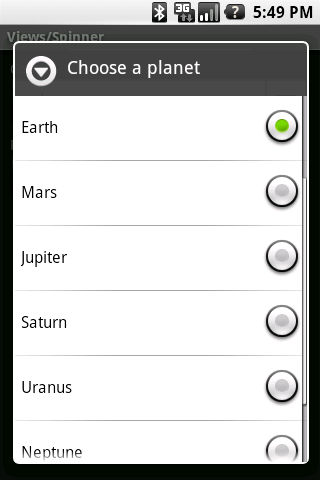
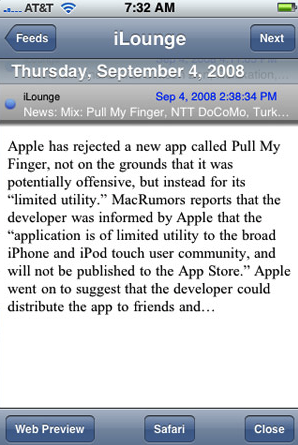
To achieve this level of quality, though, you need to be willing to adapt your app, not just design for the lowest common denominator, as is often the mentality with CORE apps. Sure, you can use the iPhone’s slick Navigation Controller bar on all versions of your app, but is that what Android users are expecting? Nor would an Android Spinner be befitting of an iPhone app.
 |
 |
You see, in some cases, CORE apps come at the expense of the most important factor: the user experience.
Why Bother?
Many people, particularly proponents of web based mobile development, are of the opinion that native UI components are not necessary to deliver a high quality user experience. I agree, in certain circumstances. Games, novelty utilities (think Flashlight), and otherwise simple apps are good examples that probably don’t benefit much from a native experience.
In my opinion, though, it’s a necessity for more complex apps, particularly ones leveraging native APIs, to use the UI that is familiar to the device. They need to work in a simple, intuitive manner as mobile users can be quick on the trigger in deeming an app unfriendly. Those who have spent time developing for multiple platforms understand that the users of each platform have different expectations.
I don’t want a navigation bar in my Android app. I want my tabs at the bottom on iPhone, the top on Android. I want to press my menu button on Android to get my app’s options. I want my system buttons to look familiar. I want to pull to refresh on my iPhone.
Let me be clear that both Appcelerator and web-based frameworks have the ability to adapt their apps to supported platforms. And I don’t just mean churning out a basic app, I mean creating a high quality, native app. Depending on your point of view, however, one may be much more appealing than the other.
Attending to the UI (Web-based)
 |
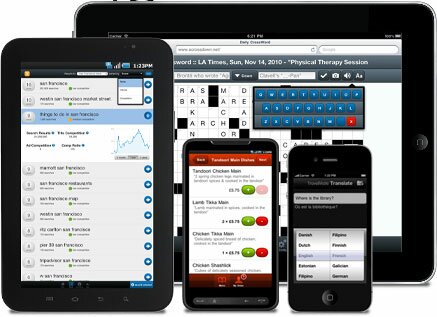 |
With web-based solutions, the app exists in a web view container. This means that you are effectively building a native app that consists of only a web view which hosts a web application. You have no native components with which to work. This leaves us with 2 options for building the UI of the app (super quick assessment coming):
- Use a 3rd party framework like jQuery Mobile or Sencha Touch
- Pros
- Lots of functionality and UI components
- Speeds up development process
- Some, like Sencha Touch, have a very native look to their components.
- Cons
- Web based framework UI is generally less responsive than ones created natively or with Appcelerator on mobile devices.
- Additional learning curve for the added framework
- You are even further removed from the native app. You now have a UI framework which sits on a native web view wrapper which then becomes a native app. Lots to know and lots of places for things to go wrong.
- Frameworks like Sencha Touch are limited to webkit based web views (iOS, Android, BB 6.0+). This essentially removes the biggest advantage of web based frameworks, which is their compatibility.
- Pros
- Create the UI yourself with HTML/CSS/JS
- Pros
- Totally customizable for any platform
- Its easier to manage performance and UI inconsistencies when using code for only what you need to achieve
- No additional learning curve beyond basic web dev and understanding your web based framework of choice.
- Cons
- Much slower to develop, as you have to build your UI from scratch. The styling of the UI to look native all falls on you or external resources you can find.
- Even for seasoned web devs, managing cross platform mobile CSS can be a daunting task.
- All cross browser inconsistencies become your job to address, unless you use a light JS framework like xuijs or zeptojs.
- Pros
So as you can see, web based mobile development encounters many of the same issues that traditional web development does. And the problem is compounded when you are trying to make these web based solutions look, feel, perform, and behave natively.
Attending to the UI (Appcelerator)
Appcelerator apps are built differently. The extremely short version is that Appcelerator Javascript code is mapped to native symbols of the target platform. Any code that can’t be mapped to a native symbol is run through a Javascript interpreter. , CEO of Appcelerator, does a much better job of explaining it in this StackOverflow post.
What this means that there are no 3rd party tools or special code necessary to create totally native components. You want a button that has native appearance and behavior on both iPhone and Android?
var button = Ti.UI.createButton({title:'test button'});
 |
 |
There you go, an Android and iPhone button respectively. How ’bout a table view populated with sample data?
var data = [{title:"Row 1"},{title:"Row 2"},{title:"Row 3"},{title:"Row 4"},{title:"Row 5"},{title:"Row 6"}];
var table = Titanium.UI.createTableView({data:data});
 |
 |
Yep, it’s that simple. The iPhone table will even have the bounce scrolling users expect. You have the same simplicity that web based UI frameworks solutions provide, except you are additionally getting native look, feel, performance, and behavior. The components are even designable as you would expect them to be.
The one drawback to this simplicity is that without careful attention to your code, you can end up with a mess of interlacing UI and logic. Android has XML for layout, iOS has .nib/.xib files, web based solutions have HTML/CSS. Appcelerator, for the time being, relies solely on your Javascript code. Javascript MVC frameworks, like PureMVC, and attention to best practices (as mentioned in the online training videos) can mitigate this risk. There are even some vague rumblings of a more declarative syntax for UI design in the future…
Adaptation
So now that we know how UIs are built in both Appcelerator and web-based frameworks, how do we adapt them in such a way to deliver a native user experience? Despite the differences between the frameworks mentioned so far, the solution is fairly common among all frameworks.
While I will confidently say that Appcelerator has the abstraction that delivers the most familiar and device-specific experience, it too needs to account for usability that is not necessarily CORE. And even saying it is not CORE can be a bit of a misnomer as the same code base can be used by multiple platforms. It just requires the clever and judicious insertion of platform specific code facilitated by your mobile framework’s device identification APIs.
Let’s take a quick look at how Appcelerator identifies your device and can act on the information:
var osname = Titanium.Platform.osname;
if (osname == 'android') {
    // android specific code
} else if (osname == 'iphone') {
    // iphone specific code
} else if (osname == 'ipad') {
    // ipad specific code
}
For a more in depth example of how you can use this logic to create truly cross platform components and functionality, check out the 6 minute screencast “Forging Titanium: A Cross-Platform Navigation Controller.” Or just watch this:
And for reference, let’s look at PhoneGap’s adaptation method as well, just to show the similarities:
var platform = device.platform;
if platform == 'Android') {
    // android specific code
} else if platform == 'iPhone') {
    // iphone specific code
} else if platform == 'BlackBerry') {
    // blackberry specific code
}
Very similar indeed, but you need to consider the 2 prior “Attending to the UI” sections before calling them equal. Its the frequency with which you are required to apply this and other types of adaptation that affects the maintainability of your app as it grows.
Minimizing Adaptation
It doesn’t take an expert software engineer to see that conditional checks on the device’s platform throughout your code isn’t ideal. It gets harder to maintain the more conditionals you include. It becomes apparent that we need our development framework to do most of this work for us.
In the case of Appcelerator, the need for conditional adaptation is minimized by the fact that you can utilize native UI components. Look back at our examples of the buttons and table views. There was no conditional code, no special handling. You get system specific components with no extra effort.
You really only need conditional code when you want to leverage native components that don’t have an equivalent on your other target platforms. For example, if you haven’t already, check out the Cross-Platform Navigation Controller video above. It shows how you can use these conditionals to create navigation code that you can use seamlessly between iOS or Android.
Web based platforms also do a great job of creating an abstraction so that you don’t need to use conditionals for each supported platform. The problem, as discussed earlier, is that these abstractions don’t represent actual native components. They most often represent HTML/CSS/JS that are attempting to mimic native components. Worse yet, sometimes they are components that have no relation to existing native components, yet find themselves in native apps. As I said, this is a point of contention among mobile developers, and I’ll leave further discussion for the comments if necessary.
What web based frameworks can’t give you in native components, they provide in CSS, often applied dynamically via Javascript. The use of CSS is a double-edged sword. On one hand, you have a method of styling that not only allows you to skin your whole app, but also affords you the opportunity to gracefully degrade the styling based on the user’s device. This is why web based solutions typically support more platforms than ones like Appcelerator. Add all the bells and whistles like rounded corners, drop shadows, webkit transitions, etc… and if the device doesn’t support them, they will disappear without interrupting the user experience.
On the other hand, unless you are a CSS wizard with existing knowledge of CSS3 and how it applies to mobile, using it can be difficult. You can find yourself with mountains of CSS attempting to mimic components that are created with a single line of code in Appcelerator. For example, here’s a shiny iPhone button in pure CSS:
input[type=button] {
  font-family: "Helvetica Neue", Helvetica, sans-serif;
  font-size: 1.3em;
  font-weight: bold;
  width: 97%;
  height: 50px;
  border: 3px solid #282726;
  background: -webkit-gradient( linear, left top, left bottom, from(#e2e2e2), to(#8c8a88), color-stop(0.5, #acadae), color-stop(0.5, #82807e) );
  margin: 0 0 3px 0;
  text-shadow: 0px 1px 0 #cecece;
  -webkit-background-origin: padding-box;
  -webkit-background-clip: border-box;
  -webkit-border-radius: 8px;
}

input[type=button]:hover, input[type=button].cancel,
input[type=button]:active, input[type=button].cancel:active {
  color: #fff;
  text-shadow: none;
}

input[type=button]:hover, input[type=button].cancel:hover {
  background: -webkit-gradient( linear, left top, left bottom, from(#aaaee5), to(#10006d), color-stop(0.5, #1F3B97), color-stop(0.5, #081f6f) );
}

input[type=button].cancel {
  background: -webkit-gradient( linear, left top, left bottom, from(#5c5c5b), to(#1e1b16), color-stop(0.2, #1e1b16) );
  margin-top: 6px;
}
It does the job, but man, it is really cumbersome. Again, this is all a factor of wanting to create a native experience. Some will contest that it does not need to be this complex, that as long as the UI is uniform it does not need to conform to the native expectations. This mentality, though, is typically only held by those who back mobile frameworks that are incapable of delivering that native experience. As the local radio sports caster in Pittsburgh likes to say, “Not hatin’, just sayin’.”
Summary
You can’t beat web based mobile development for platform compatibility. Every mobile device has a browser that supports HTML/CSS/JS, right? You can create UIs that work on many platforms and degrade gracefully to handle lower end devices. Quality, usable apps are totally possible with these frameworks.
But the user doesn’t care how compatible your app is. They just want it to work, as they expect it to, on the device of their choice. In this respect, Appcelerator is unparalleled in the realm of cross platform solutions.
I have a strong suspicion that web based mobile technologies are only going to get better. I mean, let’s face it, the web isn’t going to be disappearing anytime soon. It will get faster, more functional, and closer to the expectations of the mobile user, just like desktop web browsers. And I, as a soon-to-be Appcelerator employee, welcome this.
As web based mobile development ups it game, so shall Appcelerator. Whether you’re an Appcelerator, web based, or native developer, it’s an exciting time… no matter what side of the fence you’re on.